
If you’ve noticed ads suddenly showing up on YouTube again, even with uBlock Origin enabled, you’re definitely not alone. This issue has become more common recently, and it’s not because your setup is “wrong.”
The real reason is simple: YouTube is constantly changing how ads are delivered and actively trying to detect ad blockers. As a result, even a well-configured blocker can stop working overnight.
From here, you have two options either go with uBlock Origin alternatives or fix this one. If you ask me, I choose the second option. Here’s what actually helps without wasting any of your time on things that don’t last.
Why uBlock Origin is Not Working on YouTube (Quick Fix)
There could be several things messing with it. Fixing them might get your ad blocker
working again. Here’s why it might not be doing its job:
- Manifest V3 Mess – Google’s recent update basically handcuffed ad blockers, limiting how they interact with web requests. It’s made the job of blocking way more complex.
- Filters out of date – If your lists haven’t been refreshed lately, uBlock won’t recognize YouTube’s newest tricks.
- Browser cache problems – Old cookies and cached data mess with uBlock, making it glitchy. Clearing them might fix it.
- Clashing extensions – If you’re running a VPN with a built-in blocker or a second ad-blocking extension, they often fight each other, causing both to fail.
- Bad custom filters – Custom rules that worked before might be outdated. Check and tweak them when needed.
- YouTube’s sneaky ad tricks – YouTube has started “stitching” ads directly into the video file itself, making them incredibly difficult for extensions to identify and cut out.
- Old Software – If you aren’t on the latest build of uBlock, you’re missing the newest “counter-measures.
- Browser restrictions – Some browsers (Safari, mobile OS, etc.) limit how extensions work. uBlock might not function fully.
- Network-level ads – Some ads come from the ISP or are embedded in content, making them nearly impossible to block.
- Slow filter updates – If the filter lists don’t update often, ad blockers fall behind as YouTube changes tactics.
Make Sure Your Filtering Mode Isn’t Too Basic
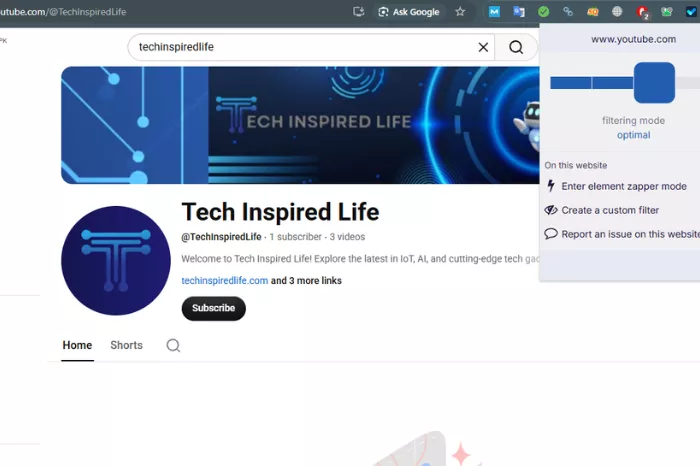
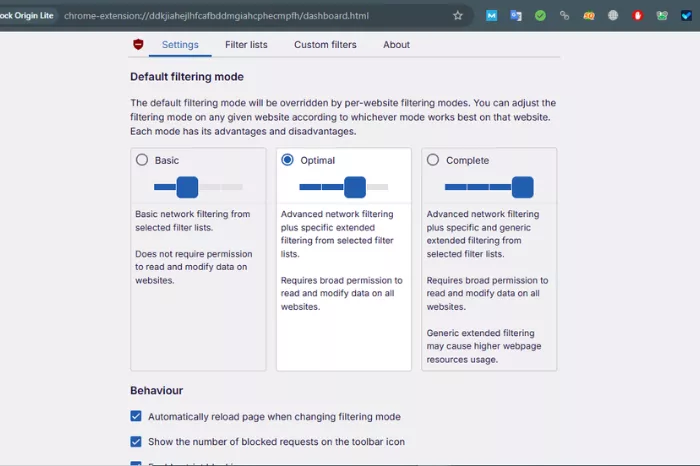
Start by opening the uBlock Origin dashboard and heading to the Settings tab.
You’ll see a section called Default filtering mode. If it’s set to “Basic,” that’s likely part of the problem.
Switch it to:
- Optimal (best balance)
- or Complete (stronger blocking, but may break some sites)
In testing, switching from Basic to Optimal mode usually improves the effectiveness of ad blocking on YouTube.
Ensure Filter Lists Are Enabled & Updated
Go to the Filter lists tab in uBlock Origin.
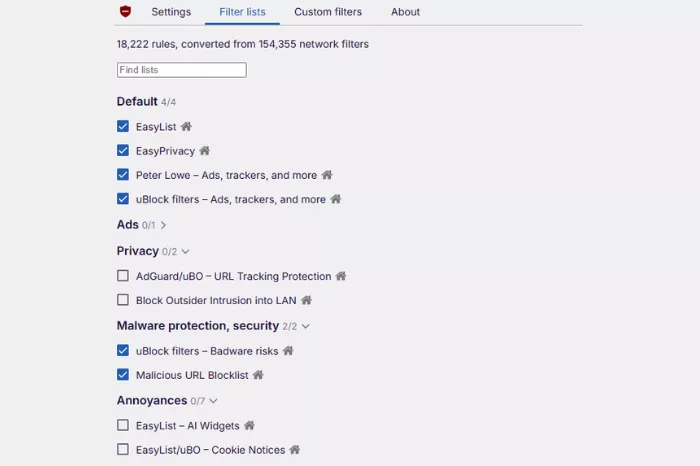
Make sure important lists are enabled, such as:
- EasyList
- EasyPrivacy
- uBlock filters
In most cases, uBlock automatically updates these lists in the background, so you won’t always see an “Update now” button. The important thing is to ensure these lists are checked and active.
Add Custom Filters — But Don’t Rely on Them Forever
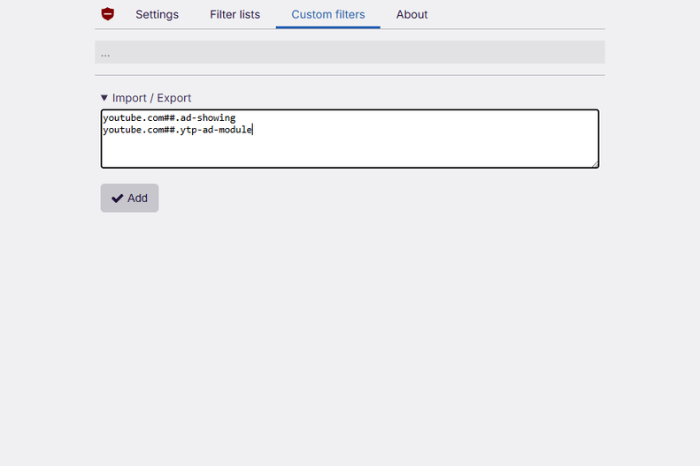
Go to the Custom filters (My filters) tab
You can add rules like these:
- youtube.com##.ad-showing
- youtube.com##.ytp-ad-module
Then click Apply changes.
Here’s the honest part:
Custom filters can work, but they’re not a permanent solution. YouTube frequently changes how ads appear, so filters that work today might stop working next week.
Refresh Properly (Most People Skip This)
After making changes, don’t just reload normally.
Use:
Ctrl + Shift + R (hard refresh)
This clears cached content and forces YouTube to load fresh data.
It sounds small, but it actually makes a difference.
Your Browser Matters More Than You Think
Not all browsers support ad blockers equally anymore.
In my testing:
- Firefox continues to work reliably with uBlock Origin
- Chrome has become less effective due to newer extension limitations
If nothing else works, switching browsers can make a noticeable difference.
Why This Keeps Happening
It helps to understand what’s going on behind the scenes.
YouTube is owned by Google, and ads are its main source of revenue. Because of that, it continuously updates its system to:
- Detect ad blockers
- Bypass filters
- Limit how extensions can interact with pages
That’s why there’s no “set it and forget it” solution anymore.
Practical Tips That Actually Help
Instead of chasing quick fixes, these habits work better long-term:
- Update filter lists regularly
- Avoid installing multiple ad blockers at once
- Stick with trusted extensions like uBlock Origin
- Don’t depend entirely on custom filters
Final Thoughts
uBlock Origin isn’t broken — it’s just dealing with a moving target.
Most of the time, a quick filter update or small settings change is enough to get things working again. But it’s also worth accepting that occasional fixes will always be part of the process now.
If you approach it with that mindset, it becomes much less frustrating — and a lot easier to manage.
FAQs
This is one of the most searched topics. A lot of users are curious as to whether it’s a bug or something else. YouTube is the true offender. It continuously improves a delivery system, frequently avoiding static rules or out-of-date filter lists.
Issues with site interaction while uBlock is activated are often mentioned in user reports. For example, not being able to navigate YouTube or press the play button. It’s a recognized problem that calls for actions like upgrading filters, deleting the cache, or adjusting custom rules.
A common solution is to update the filters. The efficacy of ad-blocking on YouTube frequently declines due to out-of-date filter lists. Therefore, accessing uBlock’s dashboard, clearing the cache, and resetting the filters is frequently the first recommended action.
You can still skip ads by using YouTube’s built-in skip option when available or by choosing viewing options that reduce ads, such as shorter videos or trusted creators with fewer ads.
Because YouTube uses anti-adblock scripts to detect missing ads
