
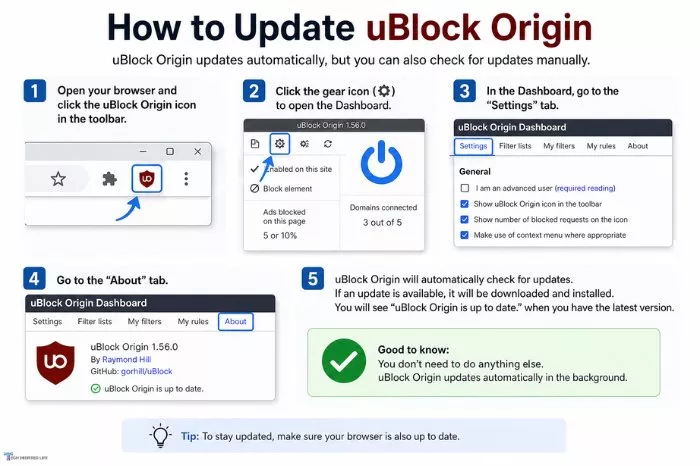

Keeping uBlock Origin updated is the single best way to keep your web browsing fast, clean, and safe from intrusive ads. While the extension usually does a decent job of updating itself in the background, sometimes you just do not want to wait around for it. Forcing a manual update guarantees you have the absolute newest features and security patches the exact moment they drop.
Why Bother Updating Manually?
Think of uBlock Origin as a shield. It relies on massive lists of rules to know exactly what to block and what to let through. Web developers and advertisers are smart, though. They constantly change their site code to find ways around these blockers.
When you update the extension and its lists, you get the latest countermeasures. Plus, the developers are always tweaking the code to make it run lighter on your computer, saving you precious CPU power and memory.
How to Force an Extension Update
Every browser handles its add-ons a little differently. Depending on what you use to surf the web, follow these steps to grab the newest version right now.
For the Firefox Users
Firefox makes managing your add-ons incredibly straightforward. You can check for updates with just a couple of clicks.
First, click that little puzzle piece icon sitting in the top right corner of your browser. If you prefer keyboard shortcuts, hit Ctrl + Shift + A (or Cmd + Shift + A on a Mac). This opens up your Add-ons Manager.
Look for uBlock Origin in your list of active extensions. To force the update, click the gear icon near the top of that page and hit Check for Updates. While you are there, click on uBlock Origin itself and make sure you have the automatic updates toggled on. It just saves you a headache down the road.
For Chrome, Edge, and Brave Users
If you use Google Chrome or any browser built on the Chromium engine (like Brave or Microsoft Edge), the process takes an extra step because they hide the update button behind a developer setting.
Start by typing chrome://extensions directly into your address bar and hitting enter. Alternatively, you can click the three dots in your top right corner, hover over Extensions, and click Manage Extensions.
Once you are on that page, look in the top right corner for a toggle labeled Developer mode. Flip that switch on. Suddenly, a few new buttons will pop up at the top of your screen.
Click the one that says Update. Chrome will instantly scan all your installed extensions and download any available updates. Once it finishes, I highly recommend toggling Developer mode back off just to keep your browser secure.
Don’t Forget the Filter Lists
Here is a little secret: even if your main uBlock Origin extension is on the latest version, your filter lists might still be stale. If you suddenly start seeing ads on a site that used to be clean, outdated lists are usually the culprit. Luckily, clearing them out is incredibly easy.
Click the red uBlock Origin shield icon on your browser toolbar to open the quick-access window. In the bottom right corner of that popup, click the little icon that looks like a pair of gears. This opens up your main dashboard.
Click on the Filter lists tab at the top. You will see a button that says Purge all caches. Go ahead and click that. It essentially tells the extension to throw away its old, saved lists. Immediately after that, click the Update now button that lights up. uBlock Origin will reach out and grab the absolute freshest blocking rules available.
What to Do If It Gets Stuck
Sometimes technology just refuses to cooperate. If your updates are failing or the buttons seem grayed out, try a few classic troubleshooting steps.
Start by completely closing your browser and opening it back up. That simple move often triggers pending downloads. If that does not work, double-check that your internet connection isn’t acting up.
If all else fails, do not waste time trying to fix it. Just remove uBlock Origin from your browser entirely, go back to your browser’s official web store, and install it from scratch. It takes about thirty seconds, and you are guaranteed to have the newest, cleanest version running.


